Transform Photos Top Smartphone Image Editing Tools Techniques
Unlocking Creative Potential
In today’s visually-driven world, the ability to edit photos on smartphones has become not only a desired skill but an essential one for many creative enthusiasts. The shift towards visual forms of communication has made image editing tools indispensable, whether you are an aspiring photographer looking to enhance your portfolio or a casual social media user seeking to curate an eye-catching feed. These tools empower individuals to transform ordinary snapshots into stunning visuals that can captivate and engage a wide audience, offering a creative platform for self-expression.
Why Image Editing Matters
Engaging in image editing provides an avenue for creativity while significantly enhancing storytelling through visual content. Beyond just editing, these techniques allow you to infuse your images with personal narratives and artistic flair. This practice can elevate your hobbies by allowing you to:
- Express your unique artistic vision, giving life to creative ideas that reflect your personal style.
- Create captivating social media posts that stand out, which can be especially beneficial for building a personal brand or attracting more followers and interactions.
- Document personal experiences more vividly, preserving cherished moments with enhanced clarity and beauty.
What to Expect
As we delve into the world of smartphone image editing, this article will explore the top 5 smartphone image editing tools that are shaping the way we handle photography in the digital age. Each tool comes with its own set of features and techniques designed to simplify the editing process and inspire your creative journey. Expect to uncover valuable resources that will not only aid in honing your editing skills but will also serve as a catalyst for further exploration of your creative potential. Prepare to engage with a world where technology meets creativity, transforming every snapshot into a work of art.
Top 5: Smartphone Image Editing – Tools and Techniques to Transform Your Photos
In the fast-paced, visually driven world we live in, editing images on smartphones has become an essential skill not only for professional photographers but also for photography enthusiasts eager to enhance their visual storytelling. The technology available now allows us to effortlessly transform mundane snapshots into striking works of art. Join us as we delve into the top five smartphone image editing techniques you may not have fully explored yet.
5. Utilizing Filters for Instant Enhancements
Filters are among the most user-friendly tools in smartphone photography, offering an immediate way to alter the aesthetic mood of any image with just a single tap. They can transform a scene with vibrant hues or cool, muted tones, aiding photographers in achieving a distinct look without intricate editing. The benefits of using filters are manifold:
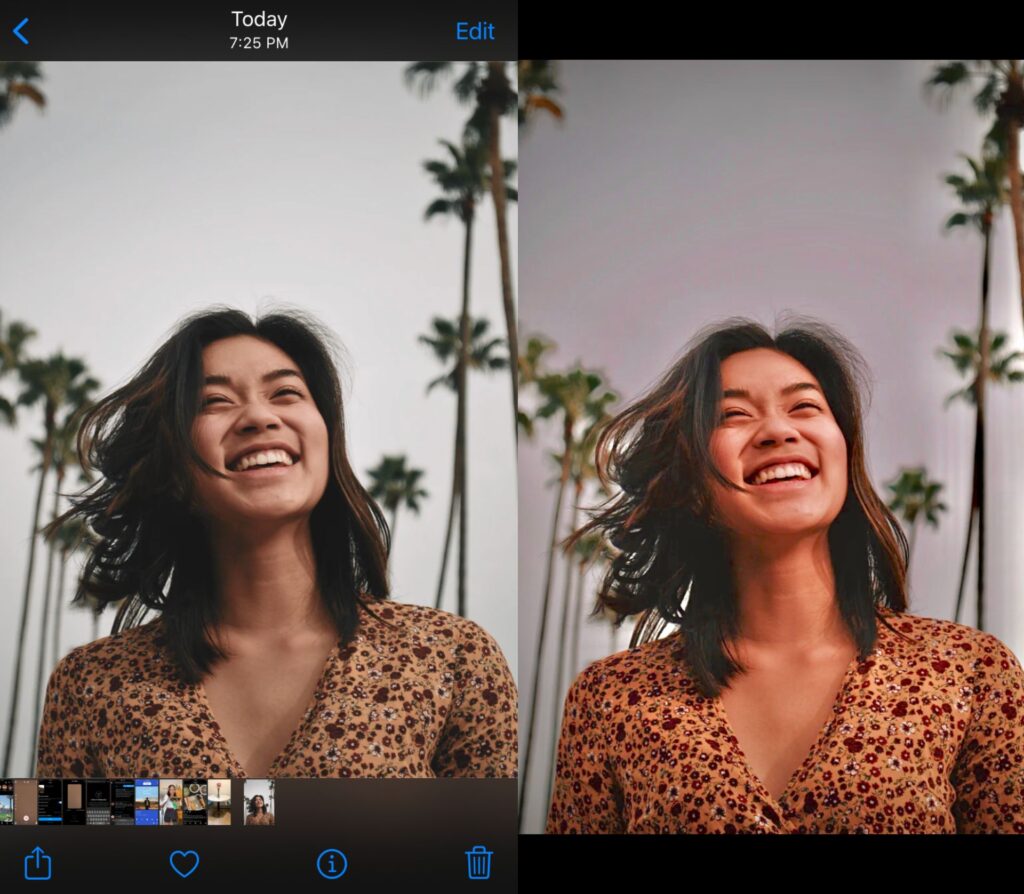
- Speed and Efficiency: Filters offer a rapid enhancement solution, especially when time is of the essence, enabling users to upgrade images with minimal effort.
- Consistency: By applying similar filters to a series of images, photographers can maintain a uniform visual style, crucial for personal branding or social media feeds.
- Accessibility: Nearly all smartphones come equipped with a diverse array of filters, making them instantly accessible for quick edits.
However, caution is advised. While filters are easy to apply, overuse can strip images of their natural appeal, resulting in overly processed photographs. The key lies in subtlety and discretion.
4. Mastering the Art of Cropping
Cropping is an indispensable technique in photography, offering a straightforward method to improve composition, focus attention, or remove distractions that detract from the main subject. Here are essential cropping strategies to enhance your photos:
- Rule of Thirds: Dividing your image into nine equal sections can help in placing key elements along these lines or their intersections, creating a balanced, aesthetically pleasing composition.
- Eliminating Distractions: Unwanted elements within a frame can draw attention away from your subject. Cropping allows you to pare down the visual clutter, producing a cleaner, more focused image.
- Aspect Ratios: Adjusting the aspect ratio prepares your images for various display formats, whether you’re posting on Instagram or printing photos for a portfolio.
Effectively cropping images not only underscores the essence of a photograph but also crafts a more engaging narrative, revealing the story you wish to convey.
3. Playing with Color Adjustment
Color adjustment tools empower photographers to refine the atmosphere and emotional tone of their images, making it a powerful approach to post-processing. Pay attention to the following components:
- Brightness and Contrast: altering these elements can unveil hidden details in shadows or emphasize highlights, enhancing depth and interest.
- Saturation and Vibrance: These adjustments allow colors to pop or subdue them for a more natural look. Finding the right balance is crucial to avoid unnatural results.
- Color Temperature: Shifting towards warmer or cooler tones can significantly change the emotional impact of a photo, providing warmth or refreshing coolness where needed.
When employed judiciously, these adjustments can inject life into your photos, evoking the emotions you aim to capture, whether it be the warmth of a sunset or the crispness of a winter morn.
2. Incorporating Text and Graphics
Adding text and graphics to your photos not only personalizes them but can also convey messages and narratives in visually engaging ways. Consider these techniques for best results:
- Choosing Fonts: The style of font you select should resonate with the theme of your image. Fun, quirky fonts work for lighthearted themes, while sleek, modern typefaces suit more professional contexts.
- Color Coordination: Ensuring your text color complements the photo’s background enhances readability and cohesively ties in with the overall aesthetic.
- Placement Matters: Experimenting with text placement can lead to discovering the most visually appealing arrangements, maintaining focus on the underlying image.
This technique transforms simple photos into compelling visuals, ideal for sharing on social media platforms or creating standout digital artwork.
1. Embracing Advanced Editing Apps
For those ready to elevate their photographic endeavors, advanced editing apps like Adobe Lightroom, Snapseed, and VSCO become invaluable allies. These apps surpass basic editing, offering robust toolsets for comprehensive photo manipulation. Consider these features:
- Professional Quality: Many apps mimic capabilities typically reserved for desktop software, bringing professional-grade editing to your pocket.
- Tools and Functions: Seek out options that include selective adjustments, healing brushes, and layering techniques, adding precision and control to your edits.
- User-Friendly Interfaces: The best apps are not only powerful but also intuitive, often supplemented with tutorials to help you quickly master their functionalities.
Devoting time to learn and explore these apps can dramatically transform your image creation, distinctively setting your work apart whether for personal projects or professional portfolios.
In conclusion, the realm of smartphone editing is ripe with tools and techniques that enable photographers of all levels to express their creativity. With a thoughtful application of filters, cropping, color adjustments, text incorporation, and advanced app use, your smartphone can become a powerful instrument of artistic expression. Mastering these aspects can lead to developing your unique photographic voice in capturing the world around you.
| Category | Key Features | Advantages | Disadvantages | Who Benefits |
|---|---|---|---|---|
| Mobile Editing Apps | User-friendly interfaces, filters, and presets | Quick edits on-the-go without needing extensive software knowledge | Limited functionalities compared to desktop software | Casual photographers looking to improve their images |
| Advanced Editing Techniques | Layering, masking, adjustment tools | Higher level of precision for professional-quality edits | Steeper learning curve, requires practice to master | Professional photographers and serious hobbyists |
| Online Tutorials | Video demonstrations, blog posts, and step-by-step guides | Accessible resources to learn and improve editing skills | Variable quality and depth of content | Anyone wanting to learn image editing techniques at no cost |
| Cloud Storage Solutions | Automatic backups, easy access from multiple devices | Safe image storage and seamless integration with editing apps | Dependent on internet connectivity for access | Photographers who store large quantities of images |
The digital age has redefined how we engage with photography, especially through the lens of smartphones that come equipped with advanced editing tools and functionalities. Mobile editing apps represent a significant leap in accessibility, allowing users to apply filters, manipulate colors, and crop photos directly from their phones. These applications are typically designed to be user-friendly, catering to the everyday consumer seeking to enhance their photographs without an in-depth understanding of editing software.However, there is a distinctive segment of users who wish to delve deeper into image modification through advanced editing techniques. These methods include the use of layering and masking, enabling precision editing that can yield professional-quality results. As wonderful as these techniques are for serious photographers looking to push their work to the next level, they do come with a challenge; mastering these tools requires practice, dedication, and a willingness to learn.Complementing the tools and techniques available to smartphone photographers are countless online tutorials. From video lessons to comprehensive blog posts, aspiring editors can access an array of resources tailored to various skill levels. This opens a world of opportunity for eager learners to improve their craft. However, users must navigate the variability in content quality; not all tutorials offer the same insight or instructional depth.As the digital footprint of photography expands, cloud storage solutions have emerged as essential for managing images. They offer automatic backups and easy access across devices, ensuring that photographers can work without the fear of losing their precious files. While this promotes a seamless workflow, it does highlight a reliance on internet connectivity for image retrieval—something photographers must consider when planning their editing projects.By exploring these categories within mobile image editing, users can empower themselves with the knowledge and tools to elevate their photographic endeavors. Modern photographers are encouraged to experiment with both trends and traditional techniques to find what suits their style best.
Frequently Asked Questions about Image Editing on Smartphones
What are the most popular apps for editing images on smartphones?
With a plethora of options available, some of the most popular and widely-used apps include Adobe Lightroom, known for its comprehensive features and color correction capabilities; Snapseed, which offers professional-grade editing tools; and VSCO, famous for its extensive filters. Each of these apps not only allows for basic edits but also provides advanced techniques to enhance your photos further.
Can smartphone editing apps match the quality of desktop software?
While smartphone apps have evolved significantly and offer a lot of advanced features, there are still limitations when compared to full software like Adobe Photoshop on desktops. However, for most users, smartphone apps provide more than enough functionality to create stunning images. The convenience and immediacy of editing on a smartphone can also add significant value. For on-the-go editing or social media posts, these apps can be more than sufficient.
What features should I look for in a good photo editing app?
When choosing a photo editing app, it’s important to look for ease of use, range of editing tools, and filter options. Consider features such as brightness, contrast, saturation adjustments, as well as more advanced options like heal tools and selective editing. Integration with social media platforms can also be important if you are planning to share your images instantly.
Are there techniques to ensure the best edits while using smartphone apps?
To get the best out of your smartphone photo edits, start with capturing high-quality images; good lighting and composition are crucial. Utilize editing apps to adjust the exposure, clarity, and color balance. Experiment with presets and filters and make incremental adjustments rather than over-editing. Lastly, keeping the original copy of the photo is wise as it gives you room to experiment with changes without losing the initial quality.
Conclusion
The realm of smartphone image editing has undergone remarkable transformations, empowering users to elevate their photos effortlessly. The exploration of this topic unveils a world where creativity knows no bounds, providing a comprehensive toolkit of editing applications and techniques to enhance and modify images directly from the palm of your hand. These tools are not just for seasoned photographers but are increasingly accessible to novices who wish to delve deeper into creative hobbies.
The top five editing tools discussed, including Adobe Lightroom, Snapseed, VSCO, Prisma, and PicsArt, each offer unique features that cater to a wide spectrum of editing needs. Adobe Lightroom stands out for its professional-grade capabilities, while Snapseed offers a user-friendly interface that does not compromise on powerful functions. On the other hand, VSCO provides aesthetic filters that appeal to artistic expressions, Prisma transforms images into artwork with ease, and PicsArt brings a creative community-driven experience to the floor.
By introducing various techniques such as basic adjustments, creative cropping, and advanced filters, smartphone editing becomes an art form that can be honed with practice. These techniques endorse the idea that anyone can attain professional results by harnessing the right tools and methods. The integration of artificial intelligence in apps further tailors editing processes, creating seamless transitions from an ordinary image to an extraordinary creation.
Ultimately, the significance of smartphone image editing in the realm of creative hobbies cannot be overstated. It provides a versatile platform where creativity can flourish and evolve. As technology advances, these tools and techniques will only continue to develop, ushering in more innovative ways to transform our photographic visions into reality. Exploring this domain not only enhances our visual storytelling but also inspires ongoing fascination and artistic exploration.

Linda Carter
Linda Carter is a writer and creative hobbies expert specializing in crafting, DIY projects, and artistic exploration. With extensive experience helping individuals discover their creative potential and bring their ideas to life, Linda shares her knowledge on our platform. Her goal is to empower readers with practical tips, inspiring ideas, and step-by-step strategies for success in the world of creative hobbies.